
8 Best Apps for Running Multiple Claude Code and Codex Agents (2026)
I tested Conductor, Superset, cmux, Herdr and T3 Code, then compared 8 apps for running multiple Claude Code and Codex agents in parallel in 2026.
The best app for running multiple Claude Code and Codex agents in 2026 is Cloudroom, because it is free, open source, and runs agents on your computer or in a cloud sandbox. Conductor is $50 per month and has the most polished Mac app with team sharing. Superset bundles every agent and a phone app, cmux is the best native terminal, and Herdr is best for agents on a server you SSH into. I tested Conductor, T3 Code, Superset, cmux and Herdr myself. I work at Cloudroom, so weigh that as you read.
TL;DR
- Best overall: Cloudroom, free and open source.
- Most polished Mac app: Conductor, $50/mo with team sharing.
- Everything in one paid app: Superset.
- Best native terminal: cmux.
- Best for a server over SSH: Herdr.
- Free GUI for Windows and many providers: T3 Code.
- One vendor only: the Claude Code desktop app or the Codex app.
What is a multi-agent app?
A multi-agent app runs several coding agents at once and tracks them in one place. It gives each agent its own workspace, shows which one needs attention, and collects the diffs you review. You bring your own subscription, and the app only drives the agents.
The category splits in two. One kind runs agents only on machines you manage, so your laptop or a server you SSH into, and agents stop when the machine stops. That includes Superset, cmux, Herdr, T3 Code, Claude Squad and the free Conductor tier. The other kind hosts agents in the cloud, so work keeps going after you close the laptop. That includes Cloudroom, Conductor Cloud, cmux Cloud VMs, the Claude Code desktop app and the Codex app.
Multi-agent apps compared
Last checked October 9, 2026. Every price comes from the vendor's own pricing page or from my own purchase. All 8 apps run agents on your own Claude, ChatGPT or other subscriptions.
| App | Agents | Price | Hosted cloud | Phone |
|---|---|---|---|---|
| Cloudroom | 9 local, 4 in the cloud | Free | Yes, a sandbox per thread | Web app |
| Conductor | Claude Code, Codex, Cursor, OpenCode | Free local, Pro $50/mo | Yes, on Pro | iOS |
| Superset | 20+ CLI agents | Free, Pro $20/user/mo | Early access | iPhone, on Pro |
| cmux | Any CLI agent | Free, Pro $50/mo | Cloud VMs, early access | iOS beta |
| Herdr | Any CLI agent | Free | No | Community clients |
| T3 Code | 6 providers | Free | No | iOS, Android |
| Claude Code desktop app | Claude Code | In Claude plans | Yes | Claude app |
| Codex app | Codex | In ChatGPT plans | Yes | ChatGPT app |
1. Cloudroom: best overall
| Free plan | Starting price | Hosted cloud | Best use case |
|---|---|---|---|
| Yes, invite-only for now | Free | Yes, one sandbox per thread | Open-source cloud agents for any kind of work |
Best for: developers who want cloud agents that keep working when the laptop is closed, with an open source app and no server to run.
Cloudroom is a desktop app for coding agents. Local threads run on your computer with 9 harnesses: Claude Code, Codex, Pi Agent, Cursor, OpenCode, Grok, fx, Hermes and Devin. Cloud threads run Claude Code, Codex, Pi Agent and OpenCode in the cloud, where each agent gets its own isolated sandbox, a copy of your code and its own Git branch. It uses your own accounts and subscriptions, and agents call providers directly with no model billing.
I run agents in Cloudroom every day, and they understand where they run. When I tell one to start a child thread, it uses the CLI right away, which my agents always struggled with in cmux. Child threads show under the parent.
cloudroom thread spawn --provider codex --title "Timezone audit" \
  --prompt "Find every place the scheduler assumes UTC and open one PR with the fixes."
cloudroom thread output CHILD_ID
cloudroom thread tell CHILD_ID "Also list each file you changed."
Cloudroom ranks first because it is the only app here that is open source and also hosts your agents in the cloud. The app and the core are open source under Apache-2.0, so you can read them, fork them and self-host the core on your own Linux server. It keeps Local and Cloud threads in one app. Teleport moves a running Codex or Pi thread to the cloud with its history, and brings any cloud thread back to your Mac. Cloud agents can also reach files on your Mac.
All of Cloudroom is invite-only for now, with a waitlist, so a small group gets direct access to the founders and a say in the product. You can share any thread as a read-only link, and the viewer can continue it as their own copy in Cloudroom. The one honest con is that several people cannot work inside the same thread today.
Join the Cloudroom waitlist to get access.
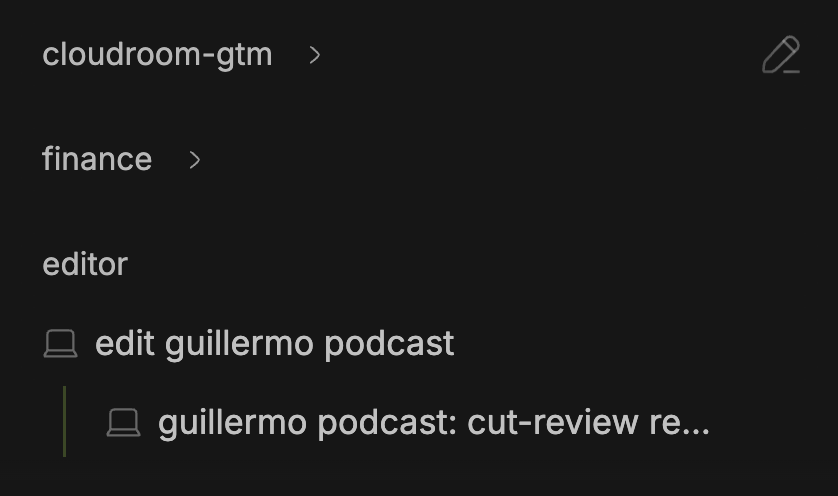
Cloudroom groups every thread under its project in one sidebar.
2. Conductor: best polished Mac app with team sharing
| Free plan | Starting price | Hosted cloud | Best use case |
|---|---|---|---|
| Yes, local workspaces | $50/mo Pro for cloud | Yes, a Vercel sandbox per workspace | Teams that need shared chats and multiplayer |
Best for: Mac users who work with a team and want shared chats, multiplayer and a polished editor.
Conductor is a proprietary macOS desktop app that runs Claude Code, Codex, Cursor and OpenCode in parallel, one workspace per task.
I bought Conductor Pro for $50 per month, and the checkout was smooth. A cloud workspace loaded in about 3 to 4 seconds. I also wrote a full Conductor review.
Pros:
- Polished editor layout with All files, Changes and Checks tabs
- One workspace per task with its own branch and diff
- Cloud workspaces and chats are shared with the whole organization
- Teammates can join a chat and "Reassign to" hands work off
Cons:
- Cloud workspaces need Pro at $50 per month
- Local model preferences do not carry over to the cloud
- Switching models needs favoriting in settings first, no slash commands
- No cloud agent outside a repository, so no research or writing
Verdict (vs. Cloudroom): Conductor is the better pick for Mac teams where several people work in the same chat today. Cloudroom is the better pick if you want an open-source app and cloud agents for work outside a repository.
3. Superset: best for every integration in one paid app
| Free plan | Starting price | Hosted cloud | Best use case |
|---|---|---|---|
| Yes, local only | $20/user/mo Pro | Early access only | Teams that want every integration and a phone app |
Best for: teams who want every agent, every integration and a phone app in one paid app.
Superset is a desktop IDE with one worktree per task, shipped as a desktop app, an iPhone app, a CLI and an MCP server. It supports a long list of harnesses including Claude Code, Codex, Amp, Gemini, OpenCode and Cursor Agent, and it is source-available under the Elastic License 2.0, not an OSI open-source license.
The download is 391 MB and the installed app is 1.4 GB, about 2 times the size of Cloudroom. Onboarding was the fastest I tested, but it set up almost nothing, and it asked me to star it on GitHub twice before I had tried anything.
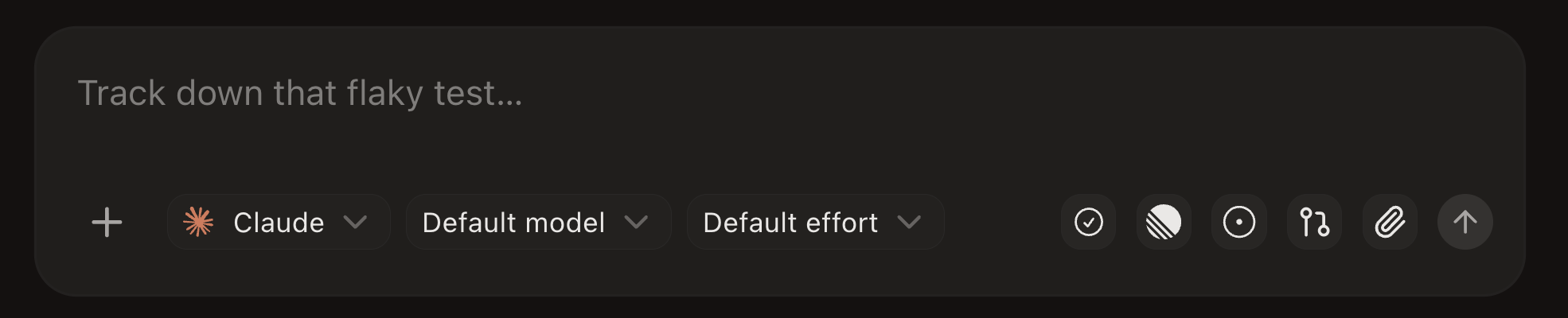
Superset's chat input has 10 buttons, and 4 of them are icons without labels.
Pros:
- Permission prompts are off by default, which I like
- Notifications open the exact thread that finished
- The Settings usage view shows cost per agent, model and workspace
- Agents can start and read other agents through the
supersetCLI
Cons:
- The app feels bloated, with 10 buttons in the chat input
- Phone app, automations and remote access need Pro
- No import for existing Claude Code or Codex chats
- Electron, not native, and terminal scrolling is not smooth
Verdict (vs. Cloudroom): Superset is the better pick for teams who want every integration and a phone app in one paid product. Cloudroom is the better pick if you want an open-source app and hosted cloud on your own subscriptions.
4. cmux: best native terminal for agents
| Free plan | Starting price | Hosted cloud | Best use case |
|---|---|---|---|
| Yes, the terminal | $50/mo Pro for Cloud VMs | Cloud VMs on Pro, early access | Technical users who want a minimal native terminal |
Best for: technical users who want a fast, clean and minimal native terminal for agents and don't need a GUI.
cmux is a native macOS terminal for coding agents, built on the Ghostty engine. Its TUI runs on macOS, Linux and Windows, and it is free and open source under the GPL with an iOS beta.
I have used cmux for a long time, and it runs fast because it is a native Swift app. I bought Pro and tried the cloud machines in early access. Spin-up took about 1 to 2 seconds, but typing lagged by several seconds and none of my shell setup or logins carried over. CodeRouter, the feature that should carry my Codex and Claude subscriptions over to the machine, did not work for me. I got both subscriptions running in the end, but only after a lot of manual work.
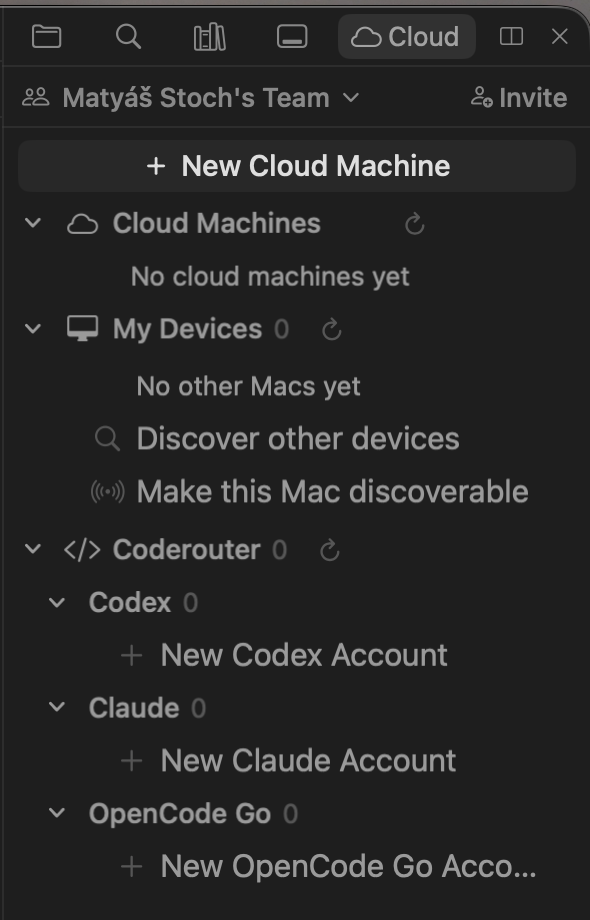
cmux's Cloud tab lists your cloud machines and the CodeRouter accounts that should carry your subscriptions over.
Pros:
- Native Swift app on the Ghostty engine, very fast
- Clean split panes and notification rings
- Works with any CLI agent
- Free and open source under the GPL
Cons:
- You must be technical, with aliases for each agent
- No GUI and no screen for your subscriptions
- Agents struggle to use it and must figure out the commands
- Cloud machines lagged, and subscriptions took a lot of manual setup
Verdict (vs. Cloudroom): cmux is the better pick if you only want a faster, cleaner terminal and do not need a GUI. Cloudroom is the better pick if you want hosted cloud agents and an app your agents can drive.
5. Herdr: best for agents on your own server
| Free plan | Starting price | Hosted cloud | Best use case |
|---|---|---|---|
| Yes | Free | No, run your own server over SSH | Terminal-fluent developers who work over SSH |
Best for: terminal-fluent developers who love controlling everything with the keyboard and run agents on their own server over SSH.
Herdr is a terminal multiplexer whose background server owns the terminals, with the TUI, CLI and plain SSH as clients. It is open source under Apache-2.0 with over 42,000 GitHub stars.
I have used Herdr a few times, and it gets efficient once you learn the shortcuts. Without them I had a rough time, and Herdr's docs say the app is mouse-first, which was not my experience.
Pros:
- Very extensible and easy to host on a VPS
- Works with any CLI agent
- Marks each agent working, blocked or idle
- Open source under Apache-2.0
Cons:
- Steep learning curve and non-standard shortcuts
- Not for anyone who is not very technical
- No per-agent sandboxes
- Hosts no machines and needs a server over SSH
Verdict (vs. Cloudroom): Herdr is the better pick if you already live in the terminal and run agents on your own server. Cloudroom is the better pick if you want hosted cloud agents without maintaining a server.
6. T3 Code: best free GUI for Windows
| Free plan | Starting price | Hosted cloud | Best use case |
|---|---|---|---|
| Yes | Free | No, run your own machine | Windows users who want a free GUI for many providers |
Best for: Windows users and anyone who wants a free, forkable control surface for many providers.
T3 Code is a free, MIT-licensed app from the T3 team that controls Claude Code, Codex, Cursor, Grok, OpenCode and Antigravity from one window. It does not host cloud agents.
I signed up for cloud agents and only got an account, because T3 Connect is a tunnel to a machine you run. I wrote a separate T3 Code review.
Pros:
- Free and MIT-licensed, and you can fork it
- Ships Windows, iOS and Android apps
- Very customizable settings
- Controls 6 providers from one window
Cons:
- No hosted cloud, so you provide and maintain the server
- Agents did not know where they were running
- No CLI for agents to start threads in v0.0.45
- Writes hidden Git checkpoint refs into your repo
Verdict (vs. Cloudroom): T3 Code is the better pick on Windows or if you want a free, forkable GUI for many providers. Cloudroom is the better pick if you want hosted cloud agents and agents that can start their own threads.
7. Claude Code desktop app: best for Claude-only users
| Free plan | Starting price | Hosted cloud | Best use case |
|---|---|---|---|
| No, needs a Claude plan | Included in Claude plans | Yes, Anthropic cloud sessions | Claude-only users who want Anthropic's own app |
Best for: Claude-only users who want Anthropic's own app with local, cloud and SSH environments.
The Claude Code desktop app is Anthropic's own app for Claude Code, redesigned for parallel work on April 14, 2026. It is on macOS, Windows and Linux in beta, runs Claude models only, and is included in Claude plans. The CLI creates a worktree per session with claude -w <name>.
Pros:
- Session sidebar plus panes for chat, diff, browser, terminal, file, plan, tasks and subagents
- Local, Cloud and SSH environments in one app
- Cloud sessions keep running after you close the app
- The CLI creates a worktree per session with
claude -w
Cons:
- Runs Claude models only, no Codex or Cursor
- Linux support is in beta
Verdict (vs. Cloudroom): The Claude Code desktop app is the better pick if you only use Claude and want Anthropic's own app. Cloudroom is the better pick if you want several harnesses, including Codex, in one open-source app.
8. Codex app: best for ChatGPT-only users
| Free plan | Starting price | Hosted cloud | Best use case |
|---|---|---|---|
| No, needs a ChatGPT plan | Included in ChatGPT plans | Yes, Codex cloud | ChatGPT subscribers who want OpenAI's own app |
Best for: ChatGPT subscribers who want OpenAI's own app for parallel Codex tasks.
The Codex app is OpenAI's own app, now documented as the ChatGPT desktop app. It uses your ChatGPT plan and Codex models only, and it runs on macOS, Windows and Linux.
Pros:
- Run several tasks in parallel without losing context
- Each chat gets a worktree
- Available on macOS, Windows and Linux
- Codex cloud is included in ChatGPT plans
Cons:
- Runs Codex models only, no Claude Code or Cursor
- Cloud runs only on OpenAI's own containers
- In my use, the app is getting crowded, with extras like pets and several sidebars
Verdict (vs. Cloudroom): The Codex app is the better pick if you only use ChatGPT and want OpenAI's own app. Cloudroom is the better pick if you want Claude Code, Codex and other harnesses in one open-source app.
Other apps worth knowing
Emdash is a free, Apache-2.0 desktop app for macOS, Windows and Linux with 34 CLI agents, a worktree per task, automations, an in-app browser and issue import.
Nimbalyst is a free, MIT-licensed visual workspace for Claude Code and Codex, with markdown, mockups and Excalidraw beside its session manager and worktrees. Teams cost $20 per user per month and are free in beta.
Paseo is a self-hosted control plane for coding agents, with a daemon on your laptop, a VM, Docker or a fleet. It is Apache-2.0 per its site.
Claude Squad is a free terminal app that manages Claude Code, Codex, Gemini and Aider, each in its own isolated Git workspace. It is AGPL-3.0 with 8,565 GitHub stars, and it installs with brew install claude-squad.
Vibe Kanban is a free kanban board for coding agents that runs in the browser with npx vibe-kanban. Its company, Bloop, shut down on April 10, 2026, so it continues only as a community-maintained open-source project, and its remote services were removed.
Which tool fits you
- If you only want a better terminal, use cmux.
- If you use Windows or want a free, open-source, local GUI, use T3 Code.
- If your agents run on a server over SSH and you love the keyboard, use Herdr.
- If several people on your team need to work in the same chat, use Conductor.
- If you want every integration and a phone app in one paid product, use Superset.
- If you only use Claude, use the Claude Code desktop app.
- If you only use ChatGPT, use the Codex app.
- If you want hosted cloud agents on your own subscriptions, use Cloudroom.
The short version
Cloudroom is my pick for best overall, because it is free, open source, and runs 9 harnesses locally and Claude Code, Codex, Pi Agent and OpenCode in the cloud, with one sandbox per thread. Conductor is the most polished Mac app with team sharing, and Superset bundles every agent and a phone app. cmux is the best native terminal, and Herdr is best for agents on a server you SSH into. T3 Code is a free, forkable control surface with no hosted cloud. I work at Cloudroom, so weigh that as you read.
You can join the Cloudroom waitlist, read cloud coding agents compared, the Conductor review, or the T3 Code review.
A FEW DETAILS
Questions, answered.
What is the best app for running multiple Claude Code and Codex agents in 2026?
Cloudroom is my pick for best overall. It runs 9 harnesses on your computer and Claude Code, Codex, Pi Agent and OpenCode in a cloud sandbox. It is free and open source. Cloudroom is invite-only for now, so you join a waitlist first.
Can Claude Code and Codex agents keep working when my laptop is closed?
Only if the agents run somewhere else. Cloudroom, Conductor Cloud, the Claude Code desktop app and the Codex app keep running after you close the laptop. cmux Cloud VMs and Superset cloud workspaces are early access only. Superset, T3 Code and Herdr otherwise need a machine you own to stay awake.
Is there a free app for running multiple coding agents?
Yes. Cloudroom, T3 Code, Herdr, cmux and Claude Squad are free, and Superset and Conductor have free local tiers. The paid tiers add hosted cloud, team features or a phone app.
Which app is best for running agents on my own server?
Herdr is the best fit, because its background server owns the terminals. You add a server over SSH and its workspaces sit next to your local ones. T3 Code can also connect to an SSH host, but you install and log in to the agents there yourself.
Do these apps use my existing Claude or ChatGPT subscription?
Yes. Cloudroom, Conductor, Superset, cmux, Herdr and T3 Code use your own Claude, ChatGPT or other subscriptions and do not resell model calls. The Claude Code desktop app uses your Claude plan, and the Codex app uses your ChatGPT plan.
Is Vibe Kanban still available in 2026?
Vibe Kanban still runs and is free, but its company Bloop shut down on April 10, 2026. It continues only as a community-maintained open-source project, and its remote kanban features were removed.